Open Enrollment Campaigns
Your Roadmap to a Successful OE

The 5-Phase EBC Approach
Use the timeline below to plan and track your client’s OE comms process with the EBC team. Phases are planned based on your client’s OE Start Date. Each phase should receive client approval.
Phase 1: Design
Timeline: 6–10 Months Prior to OE Start Date
- Select new design (if eligible): Have your client (or someone from your team) choose from the EBC Design Suite.
- Ensure accurate branding: Confirm all logos, color palettes, and brand assets are up to date.
- Preview and approve new design or changes: Review and finalize the general arrangement, color use, images, and brand application.
Pro Tip: Let EBC reach out for you
Sign your client up at [Link: XXX]. Once enrolled, EBC will reach out directly with an Interactive Design Form that allows your client to:
- Browse current designs.
- Select preferred stock images.
- Upload their branding (logos, hex codes, etc.) directly to EBC.
How to Start a Project
There are two ways to engage the EBC team:
- Automated Outreach: EBC will create a planning thread in the client’s Microsoft Teams channel XX–XX months prior to their renewal date. Simply respond to the thread to begin.
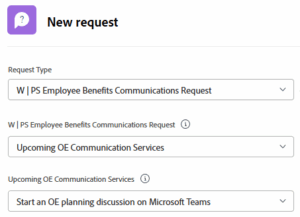
- Early Start: If you need to begin sooner, submit the Start an OE Planning Discussion form via Workfront.
Phase 2: OE Comms Planning
Timeline: 4–7 Months Prior to OE Start Date
- Identify key client concerns and potential plan changes
- Determine materials, timelines, and set the budget
- Determine post-production needs (internal/external printing, translations, and shipping speed)
Submit OE Projects via Workfront Form
The planning thread in Microsoft Teams includes a link to the Workfront Submit OE Projects form, which asks for the following information:
- Client name
- OE start date
- Primary Workfront proof approver (only one)
- List of requested materials
- Design choice (7/18 deadline for 1/1 renewal clients)
- Post-production needs (printing and translation)
Approve the Comms Plan on Teams
Once the Submit OE Projects form has been received, EBC will review it for issues and follow up with you or request approval of the plan via Microsoft Teams. It is your responsibility to:
- Ensure materials, deadlines, post-production, design choice, etc. are correct
- Inform us of any necessary changes, after which a new summary will be sent
- Approve the plan summary on Teams
Note: Work will not begin until EBC receives your plan approval.
Phase 3: Pre-Decisions Content
Timeline: 2–4 Months Prior to OE Start Date
Edit non-decision dependent content:
- Enrollment eligibility
- Introductions/Value statements
- Renewing plan and program details
Phase 4: Post-Decisions Content
Timeline: 1–2 Months Prior to OE Start Date
Edit decision dependent content:
- New plan and program details
- Confirm contributions
- “What’s changing” content
Phase 5: Post-Production
Timeline: 2–4 Weeks Prior to OE Start Date
- Confirm internal vs. external printing
- Confirm printing and translation funding
- Manage the process through to delivery
File Access: Where applicable, final High-Res (HR), Low-Res (LR), and Print-Ready (PR) PDF files are delivered to the client’s MS Teams Files tab.
- HR (High Resolution): For office printing, including Lockton’s internal print services.
- LR (Low Resolution): For web, email, and digital distribution.
- PR (Print Ready): Provided upon request for professional external vendors.
Translation
If you request translation when you initially submit your project request, EBC’s production coordinator (Jenny Ruiz Jao) will secure a quote and turnaround time with vendors upon project approval. If you need translation that wasn’t requested in your initial project request, please fill out the printing & translation form and Jenny will reach out to assist.
External Printing
If you request vendor printing on your initial project request, Jenny will reach out for more information prior to providing quotes:
- Quantity
- Locations
- Deadline
- Payment method
Essential Guidelines for Success
The Editing Process
Once the plan is approved, drafts are posted to Workfront for your review.
- Accessing Your Proofs: You can access the proofs for editing in two ways:
- By Email: Click the Go to Proof link found in the email from Workfront.
- Workfront Home Page: Click the Go to Proof link for the specific project in the My Approvals widget on your Workfront home page.
- One Approver: To ensure version control, only one primary approver is assigned per project.
- Revision Limits: We attempt to limit revisions on any given item to six, but don’t put too much focus on this. The intent is to ensure smart and efficient editing.
- Making Decisions: Always select “Changes Required” or “Approved” in Workfront. Work will pause until a decision is recorded.
Translation & Printing
- Translation: Budget 7 business days for standard translation requests.
- Internal Printing: Once you download the HR (High Resolution) file from Teams, submit the Workfront Printing & Translation Form to engage Lockton’s internal print services.
- External Printing: EBC will coordinate with vendor partners for quotes and delivery timelines. Budget 7 business days for production.
Messaging & Collaboration
Have a question? Message us in the Client Project Thread on Teams. Keeping our dialogue in the channel ensures your team and ours stay aligned.